
MarTech Integration Challenges: 7 Common Data Sync Failures and How to Prevent Them
MarTech integration challenges kill more marketing programs than bad strategy does. Here are 7 data sync failures that are costing you money, and how to fix them.


Listen to summary
0:00 audio overview
MarTech Integration Challenges: 7 Common Data Sync Failures and How to Prevent Them
Picture this. Your sales team calls a hot lead. But that lead filled out a demo form two hours ago and nobody in sales knows. The form data is sitting in your marketing platform. It never made it to your CRM.
That is not a hypothetical. It happens every day in companies with stacks full of expensive tools.
MarTech integration challenges are one of the most common reasons marketing investments underperform. It is not that the tools are bad. It is that the data between them breaks down. Silently. Slowly. At the worst possible moments.
This guide covers the 7 most common data sync failures. For each one, you will get a clear explanation of what goes wrong and practical steps to prevent it.
Why MarTech Integration Challenges Are a Business Problem, Not Just a Tech Problem
Most people treat integration as an IT issue. Set it up once, move on.
That thinking is expensive.
Companies with 20 or more tools in their MarTech stack spend roughly 40% of their total MarTech budget dealing with integration problems. Not buying tools. Not running campaigns. Fixing broken connections.
The deeper issue is this: most integration failures are not caused by bad technology. They are caused by misaligned teams, unclear data definitions, and decisions made without thinking about maintenance.
When you understand that, the fixes become much clearer.
The 7 Most Common MarTech Integration Failures
Failure 1: Chasing Perfect Data Sync
This one starts with a good intention. You want every tool to have the same data, updated in real time, always accurate.
The problem is that "perfect sync" is nearly impossible to maintain at scale. And the more you chase it, the more fragile your setup becomes.
One global IT company built connections between 12 different analytics tools, each one purchased to fix gaps left by the previous tool. When they audited the stack, they found 40% functional overlap between tools. They cut the stack nearly in half and saved $1.5 million annually.
The fix: Stop optimizing for perfect sync across everything. Instead, identify your most important data flows. For most businesses, that means lead handoffs between marketing and sales, customer history for service teams, and campaign attribution. Focus integration excellence on those. Accept that everything else can be less precise.
Failure 2: Treating Data Silos as a Tech Problem
When data lives in separate systems, the easy diagnosis is that the tools do not talk to each other. So you buy middleware. You build an API connection. You pay a developer to write a custom integration.
But two months later, the silos are back.
Why? Because data silos are usually an organizational problem, not a technical one.
When your sales team defines a "lead" one way and your marketing team defines it another way, connecting the two systems just moves the confusion faster. The data flows. The disagreement stays.
A retail brand learned this the hard way after implementing a customer data platform. The CDP unified the data correctly. But the brick-and-mortar team used event-based rules while the e-commerce team used time-based rules. Customer profiles looked wrong to both teams, even though the data was accurate.
The fix: Before you build any integration, align your teams on shared definitions. What is a lead? What is a customer? What counts as a conversion? Write it down. Get agreement. Then connect the systems.
Failure 3: Buying New Tools to Fix Old Integration Problems
Every time an integration breaks down or a gap appears, the instinct is to buy something new. A better analytics tool. A smarter data platform. A specialized connector.
This creates a cycle. Each new tool adds complexity. Complexity creates new gaps. New gaps justify the next purchase.
The same IT company from Failure 1 is a clear example. They had 12 analytics tools. None of them solved the problem because the problem was not a missing tool. It was poor integration between the tools they already had.
The fix: Before buying anything new, ask one question: does this tool solve a problem that my current tools genuinely cannot solve? If the honest answer is "not really," invest that budget in better configuration or integration of what you already own. Simpler stacks run better.
Failure 4: API Incompatibility and Field Mapping Errors
This one is genuinely technical, but it has a business cause.
Different platforms store the same data in different formats. Salesforce uses "FirstName." HubSpot uses "firstname." Constant Contact uses "Firstname." Date formats differ. Phone number formats differ. Field types differ.
When you connect two systems without mapping these differences carefully, data either fails to sync or syncs incorrectly. A contact's last name ends up in the first name field. A date shows as invalid. A phone number strips the area code.
These errors are small individually. At scale, they corrupt your database.
The fix: Build a field mapping document before any integration goes live. List every field that needs to sync, what it is called in each system, and what format it needs to be in. Treat this document as a living file and update it every time a vendor changes their API or data model.
Failure 5: Ignoring Data Latency
Real-time personalization sounds great in a vendor demo. In practice, it depends entirely on how fast your data actually moves between systems.
If your CRM updates every four hours via batch sync, your sales team is working with data that is up to four hours old. If your email platform pulls segment data once a day, the customer you are targeting may have converted yesterday.
Latency is not just a speed issue. It is a decision-quality issue.
When data is stale, decisions made from that data are wrong. Not obviously wrong. Just quietly, consistently wrong. And you often do not notice until you audit the numbers months later.
The fix: Match your sync frequency to the speed of your business decisions. High-velocity use cases, like lead routing or cart abandonment, need near-real-time sync. Lower-velocity use cases, like monthly reporting, can tolerate batch processing. Audit your most important data flows and ask: how old is this data when it gets used?
Failure 6: Underestimating Integration Maintenance
Building an integration is a one-time project. Maintaining it is an ongoing job.
Vendors update their APIs. Fields get renamed or deprecated. Data volume increases and breaks rate limits. A platform upgrade changes how records are structured. Any of these can silently break an integration that was working fine last week.
The worst part is that these failures are often invisible. The sync appears to run. No error is thrown. But records are not updating, or they are updating with wrong values. You find out three weeks later when a sales rep asks why a contact is missing from their pipeline.
The fix: Build monitoring into every integration from day one. Set up alerts when sync jobs fail or when record counts fall outside expected ranges. Assign someone to review integration health on a regular cadence. When a vendor announces an API change, treat it as a project, not an announcement.
Failure 7: The Gap Between Technical Teams and Business Teams
This is the most common integration failure in mid-sized organizations. And it is the hardest to fix.
Marketing leaders choose tools based on features, pricing, and demos. They rarely evaluate how well a tool integrates with the rest of the stack. Then they hand the integration requirement to a technical team that was not involved in the decision.
The technical team builds something that works technically. But it does not reflect how the marketing team actually needs to use the data. The marketing team asks for changes. The technical team pushes back. Integration becomes a source of conflict instead of capability.
The fix: Involve technical stakeholders in tool selection, and involve business stakeholders in integration design. Before any new tool is purchased, run a short integration review. What data needs to flow in? What data needs to flow out? Who owns the ongoing maintenance? Getting these answers upfront prevents expensive rework later.
How to Build an Integration Strategy That Actually Works
Knowing the failures is useful. Having a plan to prevent them is better.
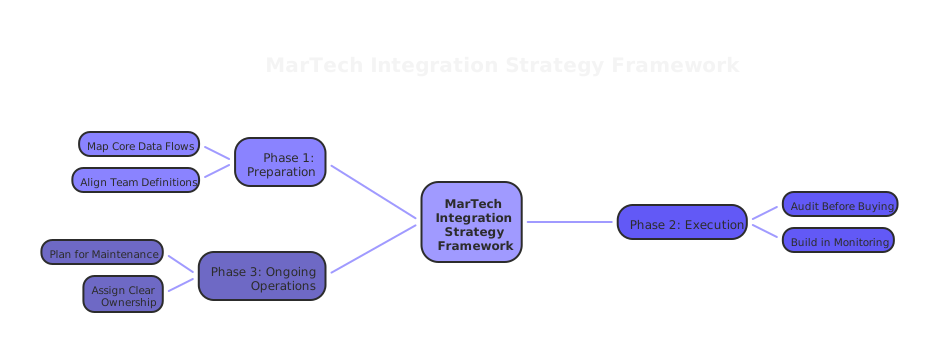
Here is a practical framework for MarTech integration challenges strategy:
Start with your most important data flows. Not everything needs to sync with everything. Map the five to ten data flows that drive your biggest business decisions. Prioritize those. Let everything else be secondary.
Agree on definitions before you connect systems. Run a definitions workshop with your sales, marketing, and service teams. Agree on what your key terms mean. Document it. Revisit it quarterly.
Build in monitoring from day one. Every integration should have a health check. Record counts. Error rates. Sync timestamps. If you cannot see whether it is working, you will not know when it stops.
Plan for maintenance, not just deployment. Budget for ongoing integration work. Assign ownership. Treat your integrations like products, not projects.
Audit before you buy. Every time a new tool is proposed, run a simple integration audit. What are the data in and out requirements? What existing integrations are affected? What is the ongoing maintenance burden?
When to Get Outside Help
Some MarTech integration challenges are straightforward to fix internally. Others are signs of a deeper structural problem in how your stack was built.
If you are experiencing multiple failures from this list at the same time, it is usually a sign that the stack needs a strategic review, not just individual fixes.
At House of MarTech, we work with businesses to audit their current integrations, identify where data is breaking down, and build a plan to fix it. Not by adding more tools, but by making the tools you already have work together properly.
If your data is not where it needs to be when it needs to be there, that is the right place to start.
The Bottom Line
MarTech integration challenges are not inevitable. They are predictable. And most of them are preventable with the right approach.
The businesses that get this right share one thing in common. They treat integration as a business decision, not just a technical task. They align their teams before connecting their tools. They plan for maintenance. They measure success by whether the data is actually useful, not just whether the sync is running.
Your MarTech stack is only as good as the data flowing through it. Fix the flow, and the rest gets easier.
Related Articles
Need Help Implementing?
Get expert guidance on your MarTech strategy and implementation.
Get Free Audit