
Non-Technical Marketing Automation Playbook
Build marketing automation workflows without engineers. Systematic playbook covers data mapping, triggers, segmentation, tests, and ops handoffs for business leaders.


You do not need an engineer to build your first marketing automation workflow. You need a plan.
Most marketing teams stall at the same point. They have a platform, a vague idea of what they want to automate, and a growing list of things that "need developer help." That list becomes a bottleneck. Leads wait. Emails go out late. Nothing connects.
The good news: the hard part of marketing automation is not technical. It is strategic. Knowing what to automate, when to trigger it, and who should receive it. That thinking is yours to own.
This playbook gives you a step-by-step process to design, build, and hand off your first marketing automation workflow, without writing a single line of code.
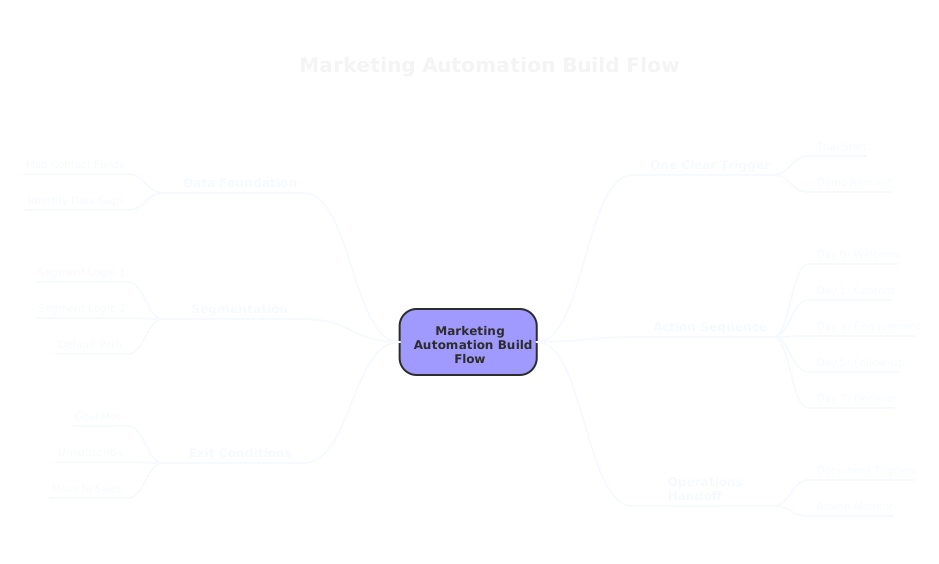
Step 1: Map Your Data Before You Touch Any Platform
The fastest way to break an automation is to start building before you know what data you have.
Data mapping is simply writing down what you know about your contacts, where that data lives, and what it means. Think of it as drawing a map before a road trip. You do not need to memorize every street. You just need to know your start point, your destination, and the key turns.
Here is what to document:
- What contact fields exist in your CRM or email platform. Name, email, company size, industry, signup date, last activity.
- Which fields are consistently filled. A field that is empty 80% of the time is not reliable for automation logic.
- Where data comes from. Form submissions, imports, integrations with your CRM, manual entries.
- What data is missing but matters. If you want to segment by purchase intent and you have no behavioral data, that gap blocks you before you begin.
You do not need a data engineer for this. A spreadsheet works. Two columns: field name, reliability (clean / partial / unreliable). That document becomes your automation foundation.
One practical tip: before you build anything, test five contact records. Open them in your platform. Check if the fields you plan to use actually have data. Five records will tell you more than any documentation.
Step 2: Choose One Trigger. Just One.
A trigger is the action that starts your automation. A new lead fills out a form. A contact opens three emails in a row. A customer has not purchased in 90 days. A free trial reaches day seven.
Most first-time automation builders try to build a system that handles every situation. That ambition produces something so complex it never ships.
Pick one trigger. Make it meaningful. A meaningful trigger is one that signals a clear shift in your contact's relationship with you.
Good starting triggers for most businesses:
- Form submission on a high-intent page (demo request, pricing page, contact form)
- First purchase completed
- Trial start date
- Re-engagement threshold (no email open in 60+ days)
Each of these signals something specific. A demo request says: this person wants to talk. A first purchase says: this person trusted us enough to buy. Your automation should respond to that signal with a relevant, timely message.
Write your trigger in plain English before you build it in your platform. "When a contact submits the demo request form on our website, start this workflow." That sentence should guide every decision in the steps that follow.
Step 3: Segment Before You Send
Not every contact who hits your trigger needs the same response. Segmentation is how you make your automation feel personal, even when it runs automatically.
Segmentation does not have to be complicated. For your first workflow, you need two or three branches at most.
A real example: a software company runs a free trial. When a trial starts, their automation splits into two paths based on company size. Contacts from companies with fewer than ten employees get onboarding emails focused on quick wins and self-serve setup. Contacts from companies with more than 50 employees get emails that emphasize team collaboration features and include a prompt to book a call with sales.
Same trigger. Two segments. Completely different conversations.
For your first workflow, ask one question: is there a single data point that would make my message more relevant? Company size, industry, product interest, geographic region. Pick the one that matters most to your business. Use it to create two paths. Keep it simple.
Segmentation rules to follow early on:
- Use only fields that are consistently populated (remember your data map from Step 1)
- Avoid nesting more than two levels of conditions in your first build
- Always include a default path for contacts who do not match any segment
That last point matters. Contacts who fall through your conditions still need to go somewhere. A default path prevents them from disappearing into silence.
Step 4: Design the Sequence
Now you build the actual flow. A marketing automation workflow is a series of messages and waits, triggered by your chosen event and shaped by your segments.
A simple, effective first sequence looks like this:
Day 0: Trigger fires. Send immediate confirmation or welcome message.
Day 1: Send your most useful piece of content. Not a sales pitch. Something that helps them do one thing better right now.
Day 3: Check a condition. Did they open the Day 1 email? Did they click a link? Branch accordingly.
Day 5: Follow up based on behavior. Engaged contacts get more depth. Unengaged contacts get a simpler message with a single clear call to action.
Day 7: Decision point. Move engaged contacts toward the next stage of your funnel. Exit unengaged contacts or move them to a re-engagement list.
Seven days. Five touchpoints. One decision at the end. That is a complete first workflow.
Keep your copy short. Each email should have one purpose. One message. One link. The more choices you give someone, the fewer actions they take.
Set your wait times based on your actual sales cycle. A SaaS trial with a 14-day window needs a tighter sequence than a B2B product with a 90-day sales cycle. Match your timing to your buyer's reality, not to a generic template.
Step 5: Set Frequency Rules and Exit Conditions
Two things kill automation programs fast. Sending too often. And sending forever.
Frequency rules limit how many automated messages a contact can receive in a given period. Without them, a contact who qualifies for three different workflows can receive ten emails in a week. That is not marketing. That is noise.
Most platforms let you set frequency caps at the contact level. Use them. A reasonable starting point: no more than three automated messages per week to any one contact.
Exit conditions are equally important. They tell your automation when to stop. Common exit conditions:
- Contact books a meeting (exit the nurture, start the sales follow-up)
- Contact makes a purchase (exit the trial sequence)
- Contact unsubscribes (exit everything)
- Contact manually added to a suppression list by your team
Write these conditions before you build. It is much harder to add them cleanly after the fact.
One often-skipped step: check your privacy and consent requirements. If you operate in markets covered by GDPR, CCPA, or similar regulations, your automation must respect consent status. Your platform likely has consent fields. Map them in Step 1, and filter on them here. Sending automated messages to contacts who have not opted in is not just a legal risk. It actively damages your sender reputation.
Step 6: Test Before You Launch
Testing a marketing automation workflow is not optional. It is the step that separates a workflow that works from one that embarrasses you.
You need two types of tests before going live.
Functional testing. Send yourself through the workflow. Create a test contact. Fire the trigger manually. Confirm that every email arrives, every wait time behaves correctly, and every branch routes to the right path. Check this on desktop and mobile. Check it across at least two email clients.
Logic testing. Create test contacts for each segment. Make sure a contact who should go to Path A does not accidentally land in Path B. Check your exit conditions. Make sure a contact who books a meeting actually exits the workflow.
Document what you tested and what you found. A simple log works: test date, what you checked, result, fix applied. This matters later when something breaks and you are trying to figure out what changed.
One QA check most people skip: test what happens when a field is blank. If your segmentation relies on a company size field and that field is empty, where does the contact go? Your default path should handle this. Confirm that it does.
Step 7: Hand Off to Operations
A workflow you built is not a workflow your team knows how to manage. Before you go live, you need to document what you built and who owns what.
Your handoff document does not need to be long. It needs to answer these questions:
- What does this workflow do? One sentence.
- What triggers it? Specific trigger event and source.
- Who does it send to? Segment logic in plain English.
- What does each email contain? Subject line and one-line description of purpose.
- What are the exit conditions?
- Who is responsible for monitoring it? Name, not a department.
- How often should it be reviewed? Monthly is a good starting cadence.
- Where are the assets stored? Link to the folder with email copy, images, and any related content.
That document is your ops handoff. Share it with whoever manages your CRM or sales operations. Make sure they know the workflow exists, what it does, and how to pause it if something goes wrong.
If you work with a team like House of MarTech, this documentation becomes part of a broader RevOps structure that connects your marketing automation to your CRM, your sales process, and your reporting. That connection is where automation stops being a marketing tool and starts being a revenue driver.
What Is a Marketing Automation Workflow?
A marketing automation workflow is a pre-built sequence of messages and actions that runs automatically when a contact meets a defined condition. It removes manual steps from repetitive processes, like sending a welcome email or following up after a demo request, while keeping the communication timely and relevant.
A well-built workflow does three things: it responds to real contact behavior, it delivers the right message to the right person, and it knows when to stop.
Common Questions
Do I need a developer to build marketing automation workflows?
No. Most modern platforms, including HubSpot, Klaviyo, ActiveCampaign, and others, are built for marketers to configure without code. The work is strategic, not technical.
How long should my first workflow be?
Five to seven touchpoints over seven to fourteen days is a strong starting point. You can extend it once you see how contacts engage.
When should I review and update my workflows?
Review active workflows monthly for the first quarter. After that, a quarterly review is sufficient unless you make significant changes to your product, pricing, or messaging.
What if my data is messy?
Start with what is clean. Build your first workflow around the data fields that are consistently populated. Fix data quality in parallel. Do not wait for perfect data to start automating.
Your Next Step
You do not need to automate everything at once. You need to automate one thing well.
Start with your highest-volume, highest-intent trigger. Map your data. Segment simply. Build a short sequence. Test it. Document it. Launch it.
That first workflow teaches you more about your audience than any planning session. The insights it surfaces will shape every workflow that follows.
If you want a second set of eyes on your plan before you build, or help connecting your automation to your CRM and sales process, that is exactly the kind of work we do at House of MarTech. No jargon. No overcomplicated tech stacks. Just a clear path from idea to working system.
Start with one workflow. Build it right. Then build the next one.
Related Articles
Need Help Implementing?
Get expert guidance on your MarTech strategy and implementation.
Get Free Audit