
Solving API Rate Limiting and Webhook Failures: Advanced Troubleshooting for MarTech Integration Sync Issues
Solve API rate limiting, webhook failures, and sync errors in MarTech integrations. Advanced troubleshooting techniques with code examples.


TL;DR
Quick Summary
Listen to summary
0:00 audio overview
Solving API Rate Limiting and Webhook Failures: Advanced Troubleshooting for MarTech Integration Sync Issues
Picture this. Your team launches a campaign. The audience segment looks right in the CDP. But only 60% of contacts actually receive the email. Nobody gets an error message. Nobody gets an alert. You find out three days later when someone reconciles the send numbers by hand.
That is not a rare edge case. It is one of the most common and costly failures in modern MarTech stacks, and it almost always traces back to API rate limits, webhook failures, or silent sync errors.
This guide covers how to find these problems, fix them, and build systems that stop them from repeating.
Why MarTech Integration Failures Are Hard to Spot
Most integration failures are not loud. They do not crash your platform or send you a red alert. They quietly drop records, skip contacts, or deliver stale data, and you only notice when a business metric looks wrong.
Here is why they stay hidden.
Your CRM, CDP, email platform, and data warehouse each have their own logs. None of those logs talk to each other. So when a failure happens across three systems, each team looks at their own data and concludes the problem lives somewhere else.
This is the core challenge in martech integration troubleshooting. It is not just technical. It is also organizational. The tools exist to solve these problems. What is often missing is visibility across the full data path.
What API Rate Limiting Actually Means in Practice
Every API has a limit on how many requests you can send in a given window. Exceed that limit and you get a 429 Too Many Requests response. At that point, your integration must wait before trying again.
Rate limits exist for good reason. They protect the platform from being overwhelmed. But in a busy MarTech stack, they create friction fast.
Common scenarios where rate limits cause problems:
- A CDP refreshes audience segments every 5 minutes instead of hourly, consuming 80% of your CRM's API quota before other systems can make requests.
- A reverse ETL job and a live enrichment workflow both query the same data warehouse simultaneously, pushing latency past timeout thresholds.
- An AI-driven personalization tool bursts API calls during a campaign launch, rate-limiting your email platform at the worst possible moment.
Rate limit failures rarely announce themselves clearly. They show up as missing records, delayed syncs, or contacts that never entered a journey.
The Three Most Common Webhook Failure Modes
Webhooks are event-driven notifications. When something happens in System A, it sends a webhook to System B. Simple in theory. Unreliable in practice, for three main reasons.
1. The Webhook Fires but Nobody Is Listening
If your receiving endpoint is down, slow, or returning errors, the webhook provider retries. Retry windows vary by platform. Stripe retries for 3 days. Shopify retries for 48 hours. GitHub retries for roughly 5 days. If your endpoint is not back up before the retry window closes, that event is lost.
2. The Webhook Arrives Twice and Gets Processed Twice
Network hiccups cause providers to send the same webhook more than once. If your system processes it twice, you might create duplicate records, send the same email twice, or charge a customer twice. This is an idempotency problem, and it is extremely common.
3. The Webhook Arrives but Fails Silently Downstream
This is the most dangerous mode. The webhook is received, acknowledged, and processed. But something in the downstream async chain fails. In Salesforce Marketing Cloud, for example, contacts flow through multiple independent processing layers. If any one layer fails, the contact drops from the journey with no visible error. Your monitoring shows green. Your campaign has a hole in it.
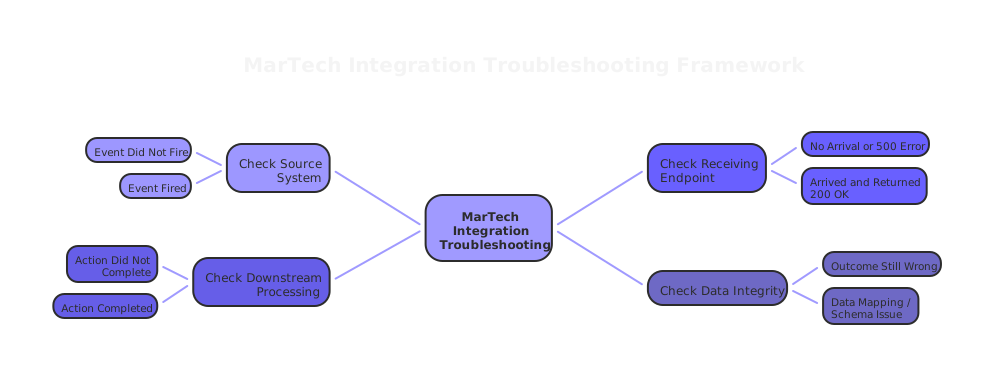
Martech Integration Troubleshooting: A Practical Framework
Good martech integration troubleshooting starts with a simple question: at which step in the data path did this break?
Work backward from the symptom.
Step 1: Confirm the event fired. Check the source system logs. Did the event actually trigger? Did the webhook send? If the source system shows no outbound event, the problem is upstream.
Step 2: Confirm delivery. Check your webhook receiving endpoint logs. Did the event arrive? What HTTP status code did you return? A 200 means you accepted it. A 500 means you rejected it and the provider will retry. A 200 returned too slowly can also cause retries on some platforms.
Step 3: Confirm processing. Did the downstream action complete? Did the record update in the CRM? Did the contact enter the journey? Did the audience sync to the ad platform? This is where silent failures live.
If all three steps show green, but the business outcome is wrong, you have a data quality issue. A field mapped incorrectly, a timestamp in the wrong time zone, or a currency conversion error.
Fixing Rate Limit Failures: Exponential Backoff and Jitter
The standard fix for rate limit failures is exponential backoff. When a request fails with a 429, wait before retrying. Double the wait time with each failure. This is the right starting point.
But backoff alone creates a new problem. If hundreds of clients all hit the same rate limit at the same moment and all start the same backoff sequence, they retry in sync. That synchronized burst hits the API again as a wave.
The fix is jitter: adding a small random delay to the backoff time.
function getBackoffDelay(attempt) {
  const base = 100; // ms
  const exponential = base * Math.pow(2, attempt);
  const jitter = Math.random() * 100;
  return exponential + jitter;
}
This small addition spreads retries across time. It takes a synchronized burst and turns it into a distributed trickle that the API can absorb.
Practical martech integration troubleshooting rules for backoff:
- Retry only on
429and5xxerrors. Never retry4xxerrors (except429). A400 Bad Requestwill fail the same way every time. - Cap your retry count. Three to five retries is sufficient for most operations. Infinite retry loops waste resources and mask the real problem.
- Log every retry with context. Source system, timestamp, attempt number, and response code. This data is invaluable when you are diagnosing patterns weeks later.
Fixing Webhook Failures: Idempotency Done Right
Idempotency means that processing the same event twice produces the same result as processing it once. This is how you protect against duplicate webhooks.
The implementation requires two things: a unique ID per webhook, and storage to track which IDs you have already processed.
Most providers include a unique ID in the webhook headers. Shopify uses X-Shopify-Webhook-Id. Stripe uses the event ID in the payload. Store this ID before you process the event, not after.
Here is the correct sequence:
1. Receive webhook
2. Check if ID exists in your deduplication store
3. If yes: return 200, do nothing
4. If no: insert ID into store (within a transaction)
5. Process the event
6. Commit
If you reverse steps 4 and 5, a crash between processing and recording creates a gap. The next retry processes the event again. That is the subtle bug most teams make.
Storage options:
- Database (PostgreSQL, MySQL): Reliable and transactional. Best for critical operations like customer record updates or revenue events.
- Redis with TTL: Faster but semi-durable. Good for less critical operations like cache invalidation or analytics events.
- In-memory: Only acceptable for throwaway events. Any server restart clears it.
Match your storage to the criticality of the operation. Do not use in-memory deduplication for anything that touches a customer record.
The Circuit Breaker Pattern: Stopping Cascades Before They Start
A circuit breaker protects your system when a dependency starts failing. Instead of continuing to hammer a failing service and making it worse, you detect the failure, stop sending requests, and return a fallback response.
The pattern has three states:
- Closed: Everything is working. Requests flow normally.
- Open: Too many failures detected. Requests are blocked. Fallback is returned immediately.
- Half-open: Testing whether the service has recovered. A small number of requests are allowed through.
In a MarTech context, this pattern is most useful for optional enrichment or personalization services. If a third-party data enrichment API goes down, your circuit breaker trips, and your system falls back to first-party data. Campaigns continue. Personalization is reduced. But nothing breaks catastrophically.
The hardest part of implementing circuit breakers is choosing the right threshold. Too sensitive, and you trip the breaker on normal transient errors. Too permissive, and cascades occur before the breaker engages. Start with 5 failures in 30 seconds as a baseline and tune from there based on observed production patterns.
Observability: The Missing Layer in Most MarTech Stacks
Here is the uncomfortable truth about martech integration troubleshooting strategy. Most teams have monitoring. They have dashboards showing email open rates, campaign delivery counts, and sync success rates. What they do not have is observability.
Monitoring tells you that something went wrong. Observability tells you why, and where in the chain it happened.
The difference matters most when failures are silent and async. You cannot monitor a failure you cannot see. You need distributed tracing: following a single record through every system it touches, recording timing and status at each step.
What to instrument first:
- Webhook receipt and acknowledgment time
- Downstream processing latency at each async layer
- Rate limit response frequency by integration and by time window
- Schema validation failures at ingestion
You do not need to build this from scratch. OpenTelemetry is a vendor-agnostic standard for collecting traces, metrics, and logs. Pair it with a backend like Datadog, New Relic, or Jaeger. Instrument your integration layer first. That is where the most valuable signal lives.
If you are running Salesforce Marketing Cloud and contacts are silently dropping from journeys, distributed tracing across the Contact Injection Service and Activity Processing Engine will surface it. Without tracing, you are reconciling numbers by hand three days after the campaign.
Rate Limit Budget Management: Allocate Before You Hit the Wall
One of the most practical martech integration troubleshooting best practices is rate limit budget management. Instead of waiting to hit a limit and then scrambling, you allocate API quota in advance.
How to implement it:
- Document the rate limits for every external API your stack uses. If the documentation is vague, test the limits in a staging environment.
- Audit which processes consume which APIs. Use your logs from observability to measure actual consumption per process.
- Assign quotas to each process. Critical real-time operations (live personalization, transaction triggers) get priority. Batch sync jobs run in off-peak windows.
- Set soft alerts at 70% of the limit, not at 100%. By the time you hit 100%, the damage is done.
This approach solved a real problem we see repeatedly at House of MarTech. A CDP syncing audiences every 5 minutes consumes quota that every other integration also needs. Adjusting to hourly syncs immediately freed up headroom, prevented 429 errors across three downstream systems, and avoided a $40,000 annual API tier upgrade.
The fix took an afternoon. The visibility to find it took instrumentation.
Schema Governance: The Silent Cause Behind Half Your Sync Failures
You can implement perfect backoff logic and bulletproof idempotency and still have sync failures. When the source system sends a field as a string and the destination expects a number, the record fails validation and gets dropped. No error alert. Just a missing record.
Schema governance is non-negotiable for reliable integrations.
Minimum viable schema governance:
- Document every field in every data contract: name, type, required or optional, and example values.
- Validate inbound data against the schema before it touches your database. Reject malformed records early and log them explicitly.
- When a source system changes a field (type change, field rename, new required field), run validation against all downstream consumers before deploying.
This is not glamorous work. But it prevents the class of silent data quality failures that make people question whether their MarTech stack is working at all.
At House of MarTech, our integration audits consistently find schema mismatches as the root cause in 30-40% of reported sync issues. Teams assume it is a rate limit problem. Often it is a type mismatch that has been silently dropping records for weeks.
A Simple Three-Phase Roadmap for Integration Reliability
If you want a structured approach to martech integration troubleshooting implementation, here is a phased plan that works in practice.
Phase 1: See your system (Weeks 1-8)
Add distributed tracing to your integration layer. Log all webhook receipts, processing times, and rate limit responses. Build a rate limit audit trail. You cannot fix what you cannot see.
Phase 2: Harden your integrations (Weeks 9-16)
Implement exponential backoff with jitter for all external API calls. Add database-backed idempotency for critical webhook operations. Add circuit breakers for optional enrichment services.
Phase 3: Govern your data (Weeks 17-24)
Document data contracts for all critical flows. Assign rate limit budgets by process. Create a schema change validation process. Assign explicit ownership for each integration point.
Most teams want to skip to Phase 2. Do not. Phase 1 tells you where to focus. Without it, you are implementing resilience patterns for the wrong integrations while the actual failures continue elsewhere.
The Bottom Line
API rate limiting and webhook failures are not exotic edge cases. They are the daily reality of running a multi-tool MarTech stack. The technical fixes are well-established: exponential backoff with jitter, webhook idempotency, circuit breakers, distributed tracing, schema validation.
What separates teams that keep fixing the same problems from teams that stop having them is not the tools. It is the discipline to instrument everything, allocate resources intentionally, and own integration points end to end.
If your team is spending time reconciling campaign numbers instead of running better campaigns, the integration layer is the place to start.
House of MarTech helps marketing and revenue teams audit, stabilize, and optimize their integration architecture. If you want a clear picture of where your stack is losing data, that is exactly the kind of work we do.
Frequently Asked Questions
Get answers to common questions about this topic
Have more questions? We're here to help you succeed with your MarTech strategy. Get in touch
Related Articles
Need Help Implementing?
Get expert guidance on your MarTech strategy and implementation.
Get Free Audit