
Email Triggers: Systematic MarTech Framework
Email triggers are not just automated messages. They are the difference between a marketing program that reacts and one that thinks. Here is how to build a system that works.


TL;DR
Quick Summary
Listen to summary
0:00 audio overview
Quick Answer
Most email programs are built backwards.
You choose a platform. You set up a welcome series. You schedule a newsletter. Then, maybe months later, someone suggests an abandoned cart email.
That is not a system. That is a to-do list.
A real email trigger strategy starts somewhere different. It starts with your customer's behavior, and it works forward from there. Every action a customer takes is a signal. Your job is to decide which signals matter and what you want to say in response.
That is what this MarTech deep dive on email triggers is about. Not theory. A practical framework you can actually use.
What Is an Email Trigger?
An email trigger is an automated message sent when a specific event or behavior occurs. The customer does something. Your system notices. An email goes out.
The event can be simple. A birthday. A first purchase. A subscription renewal.
Or it can be complex. A customer browsed a product category three times in two weeks but never bought. A price dropped on an item they viewed 30 days ago. A cart was abandoned at checkout.
The trigger itself is not the strategy. The strategy is deciding which behaviors matter to your business, what those behaviors tell you about intent, and what message makes the most sense in response.
That distinction matters more than most people realize.
The Problem With How Most Brands Use Triggers
Most brands start with abandoned cart and stop there.
That is understandable. Abandoned cart emails are well-documented, easy to justify, and they work. But treating them as the whole strategy leaves a lot of revenue sitting on the table.
The other common mistake is copying what a competitor does without asking why it works for them. A trigger sequence built for a fashion retailer does not automatically translate to a home goods brand or a B2B software company. The behaviors, the intent signals, and the right response differ.
This is where systematic thinking earns its keep.
You do not build triggers based on what is popular. You build them based on what your customers actually do and what those actions mean in the context of your business.
A Real-World Example: Zizzi's Trigger Ecosystem
Zizzi, the UK restaurant chain, built out a set of email triggers that illustrates this well.
Rather than picking one or two automations and calling it done, Zizzi developed a layered approach. They built triggers around abandoned cart behavior, price drops, and category interest. Then, importantly, they adjusted those triggers to fit their specific email marketing strategy rather than running them straight out of the box.
That last part is what separates a functional trigger program from one that just exists.
Off-the-shelf trigger logic is a starting point. It is not a finished product. The brands that see the strongest results are the ones that take that starting point and reshape it around their audience, their offer, and their funnel.
The Systematic Framework for Email Triggers
Here is how to think about building a trigger system that scales.
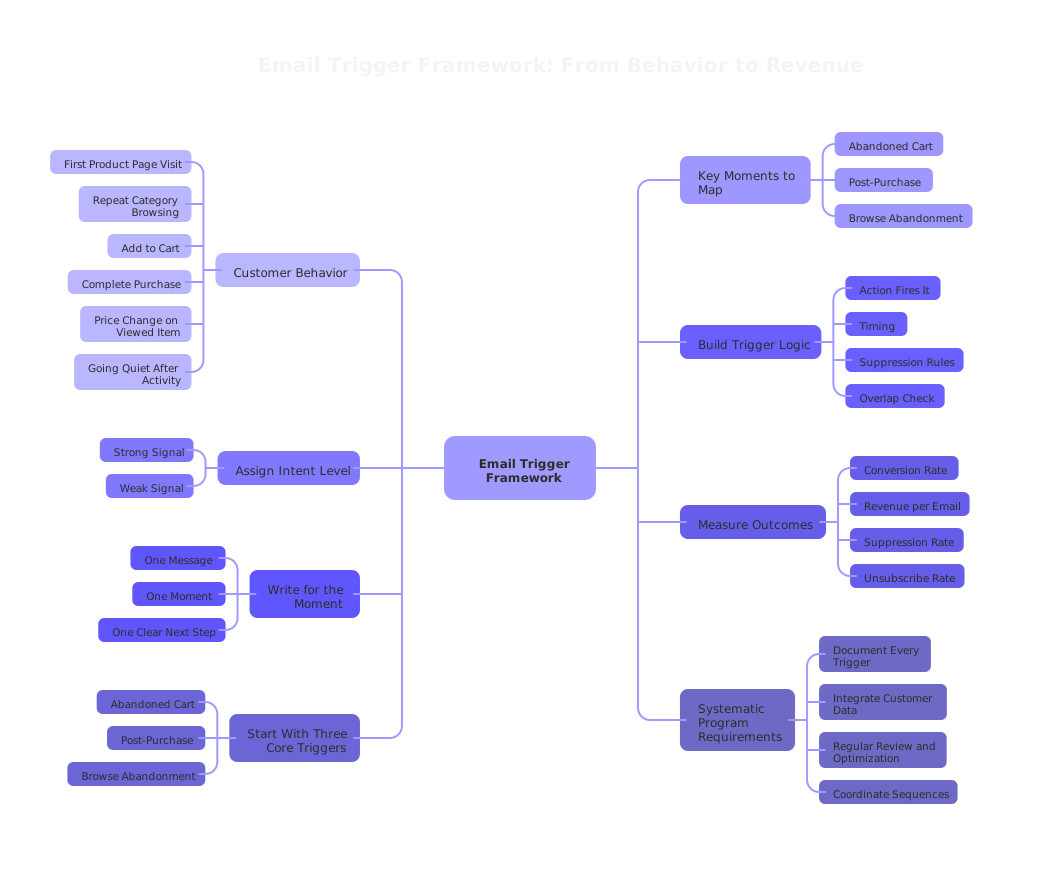
Step 1: Map Your Customer's Key Moments
Before you write a single email, list the meaningful moments in your customer's journey.
Ask yourself: what actions does a customer take right before they buy? What do they do when they are losing interest? What happens right after a purchase that could lead to a second one?
Common moments include:
- First visit to a product page
- Repeat visits to the same category
- Adding to cart without completing checkout
- Completing a purchase
- Going quiet after being active
- A price change on a previously viewed item
- A subscription nearing renewal or expiry
Not every moment needs a trigger. But mapping them gives you a clear picture of where automation can add value.
Step 2: Assign Intent to Each Moment
Every behavior carries an intent signal. Some signals are strong. Some are weak.
An abandoned cart at the payment screen is a strong signal. The customer was close. Something stopped them. That warrants a direct, timely response.
A single product page visit is a weaker signal. That customer might be interested. They might also be browsing casually. A softer, lower-pressure message fits better here.
When you assign intent levels to each moment, you can match message tone and urgency to where the customer actually is. That is what makes trigger emails feel helpful instead of pushy.
Step 3: Build the Logic Before You Build the Email
This step is where most programs break down.
Teams jump to writing copy and designing templates before they have decided on the rules. Then the rules get built around the creative, which is backwards.
Decide this first:
- What specific action fires the trigger?
- How long after that action should the email send?
- Are there conditions that should suppress the send? (For example, if they already purchased, do not send the abandoned cart email.)
- Does this trigger overlap with any other active sequence?
Clean logic prevents double-sends, irrelevant messages, and the kind of automation errors that damage trust with your audience.
Step 4: Write for the Moment, Not the Segment
Triggered emails perform better than batch emails largely because they are relevant to a specific moment. That relevance is the asset. Protect it.
Do not stuff a trigger email full of unrelated promotions. Do not make it feel like a newsletter. The customer took a specific action. Acknowledge that action and respond to it directly.
A price drop alert should be about the price drop. An abandoned cart email should focus on what they left behind. A post-purchase email should feel like a natural next step from the purchase they just made.
One message. One moment. One clear next step.
Step 5: Measure What the Trigger Is Actually Doing
Trigger performance is not just open rate and click rate. Those numbers tell you whether the email got attention. They do not tell you whether the trigger is working as a business tool.
Track these for every trigger:
- Conversion rate: Did the customer complete the intended action after the email?
- Revenue per email sent: What is this trigger actually worth?
- Suppression rate: How often is the trigger firing but being suppressed because the customer already converted?
- Unsubscribe rate per trigger: A high rate here signals the message or timing is wrong.
When you measure triggers this way, you can make real decisions about what to keep, what to adjust, and what to cut.
The Three Triggers Worth Building First
If you are starting from scratch or rebuilding a trigger program, here is a practical starting sequence.
Abandoned Cart
This is the most straightforward. Someone added items and did not buy. Send a timely reminder. Keep it focused. Test timing, often one hour and one day perform differently depending on your audience. Do not offer a discount in the first email unless your margins support it.
Post-Purchase Follow-Up
This one gets overlooked. A customer just bought from you. That is the highest point of trust in the relationship. Use it. A well-timed follow-up can drive a review, a referral, a second purchase, or a deeper product relationship. Most brands let this moment pass without saying anything meaningful.
Browse or Category Abandonment
This trigger fires when someone engages with a category or product but does not add anything to their cart. The intent signal is softer than cart abandonment, so the message should match. Think educational content, social proof, or a light prompt rather than urgency-based copy.
These three form a foundation. From there, you layer in triggers based on what your data shows.
What Makes a Trigger System Systematic
The word "systematic" gets used loosely. Here is what it actually means in practice.
A systematic trigger program is documented. Every trigger has a name, a defined firing condition, a suppression rule, and a performance benchmark. Anyone on your team can look at a single document and understand what is running, why it exists, and how to know if it is working.
A systematic program is also connected to your broader customer data. Triggers that only pull from your email platform are limited. When your triggers can read purchase history, browse behavior, loyalty status, and product interaction data, the messages become significantly more relevant.
This is where MarTech integration becomes essential. The trigger logic lives in your email platform. But the data that makes it intelligent comes from your CRM, your ecommerce platform, your CDP, and sometimes your ad tools. Getting those systems to talk to each other is not glamorous work. It is, however, the work that separates programs that are fine from programs that are genuinely effective.
If you are unsure whether your current stack supports the kind of trigger logic you want to build, that is a conversation worth having. The team at House of MarTech works with businesses specifically on this kind of integration and implementation work.
Common Mistakes to Avoid
Triggering without suppression logic. If a customer converts and your trigger still fires, you have damaged the experience. Always suppress based on outcome.
Too many triggers running at once without coordination. A customer can receive an abandoned cart email, a price drop alert, and a re-engagement message in the same 48 hours if your sequences are not coordinated. That is not a strategy. That is noise.
Setting and forgetting. Triggers need periodic review. Customer behavior changes. Seasonal patterns shift. A trigger that performed well 18 months ago may need adjustment today.
Optimizing for opens instead of outcomes. A trigger email with a 40% open rate and 0.5% conversion rate is not a success story. Measure what the trigger is supposed to do.
Where to Go From Here
Building a trigger program is not a one-afternoon project. But it does not have to be overwhelming either.
Start by mapping three to five key moments in your customer journey. Define what action fires each trigger. Write the suppression rules before you write the emails. Measure outcomes, not just opens.
If you are working with a stack that makes this harder than it should be, or if you are not sure whether your current tools can support the logic you want to build, that is worth figuring out before you invest more time in copy and creative.
House of MarTech helps businesses build and connect the MarTech infrastructure that makes trigger programs actually work. If you want a clearer picture of what your current setup can do, and what it cannot, that is a good place to start.
Frequently Asked Questions
Get answers to common questions about this topic
Have more questions? We're here to help you succeed with your MarTech strategy. Get in touch
Related Articles
Sales and Marketing Alignment Framework: How to Build Shared Revenue Goals and Unified Lead Handoff Processes
90% of Your Visitors Are Invisible: Why Pre-Conversion Behavior Is Your Biggest Blind Spot
The Cost of Inaction: What Fragmented Customer Data Actually Costs Your Business
Need Help Implementing?
Get expert guidance on your MarTech strategy and implementation.
Get Free Audit