
MarTech API Failures Playbook
Stop MarTech API failures with a systematic 7-step playbook. Diagnose connection issues, prevent cascades, and keep your marketing stack running when it matters most.


Your campaign launches at 9 AM. By 9:15, no leads are flowing into your CRM. Your automation platform says everything is fine. Your CRM says the same. But the data pipeline between them stopped working three hours ago, and nobody got an alert.
That is not a technology problem. That is a process problem. And it is one of the most common, most expensive, and most preventable issues in modern marketing operations.
MarTech API failures are not dramatic. They are quiet. They bleed data, delay campaigns, and corrupt reporting long before anyone notices. The cost is not a single outage. It is weeks of skewed attribution, missed follow-ups, and decisions made on bad numbers.
This playbook gives you a seven-step system to diagnose what broke, fix it fast, and build the kind of stack that stops failing silently.
Why API Failures Are a Marketing Operations Problem, Not Just an IT Problem
Most teams treat API errors as a technical ticket. Something goes wrong, someone files a request, IT investigates, and marketing waits.
That model is too slow. And it puts the wrong people in the driver's seat.
Marketing operations leaders need to understand enough about API behavior to ask the right questions, interpret error logs, and make smart decisions about when to escalate versus when to fix it themselves.
You do not need to write code. You do need a framework.
The Hidden Cost Nobody Talks About
Here is a scenario that plays out across mid-market and enterprise marketing teams regularly.
A retail brand runs a lead nurture sequence triggered by a form submission. Their form tool sends data to their MAP via API. The MAP enriches the record and pushes it to the CRM. The CRM triggers a sales alert.
At some point, the MAP vendor quietly updated their API from version 2 to version 3. The form tool kept sending data to the v2 endpoint, which still accepted requests and returned a 200 OK status, meaning "success." But the data was being discarded on the backend.
For six weeks, the team thought their nurture sequence was running. It was not. No leads were flowing to sales. The attribution reports looked fine because the form submissions were being counted. Only the conversion step was broken.
Six weeks of paid traffic, form fills, and zero follow-up.
That is a version compatibility failure. It is one of the most common causes of silent martech API failures, and the 200 OK response is exactly why it hid for so long.
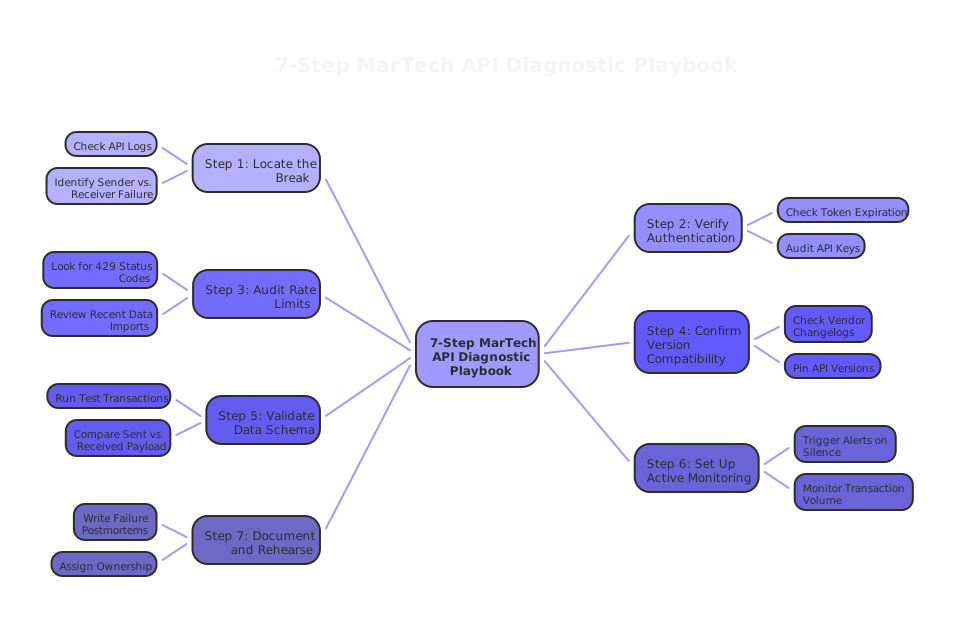
The 7-Step MarTech API Failure Playbook
Use this checklist when an integration breaks, or better, before it does.
Step 1: Confirm the Failure Is Real and Locate It
Start with the obvious question: is this actually broken, or does it just look broken?
Check your API logs first. Most platforms, your MAP, CRM, or data integration layer, store recent API call records. Look for error codes. A 401 means authentication failed. A 429 means you hit a rate limit. A 500 means the receiving server had an internal error. A 200 that returns empty data is the sneaky one.
If your tools do not expose logs directly, check your middleware or integration layer. Tools like Zapier, Make, or a dedicated iPaaS platform usually log every transaction.
Locate which side of the connection failed. Is the sender throwing errors? Or is the receiver accepting requests but not processing them?
Takeaway: Before you fix anything, know exactly where the break is. Guessing wastes time.
Step 2: Check Authentication Status
Expired credentials cause a large percentage of martech API failures. Tokens expire. API keys get rotated. OAuth connections drift when a user who authorized the connection changes their password or loses their seat.
Go into each connected platform and verify:
- Are the API credentials still valid?
- Has the connecting user account been deactivated or had permissions changed?
- If using OAuth, when did the token last refresh?
Many platforms require reauthorization after a set period. Most teams do not track this proactively. Set a calendar reminder to audit auth credentials quarterly. It takes 20 minutes and prevents outages that take days to diagnose.
Takeaway: Authentication decay is silent and common. Treat credential health like you treat password hygiene.
Step 3: Check for Rate Limit Breaches
API rate limits cap how many requests a platform will accept in a given timeframe. Hit the ceiling, and requests start getting dropped or queued indefinitely.
This is particularly relevant for platforms like Salesforce Marketing Cloud, HubSpot, or Marketo, which enforce strict per-hour or per-day limits. A spike in campaign volume, a data import, or a poorly configured automation loop can push you over the limit quickly.
Look for 429 status codes in your logs. Check your platform's API usage dashboard if one exists. Then ask: what changed recently? A new automation? A larger-than-usual import? A sync job that now runs on every record update instead of new records only?
Rate limit failures often cascade. One queued request blocks the next, and within hours your entire pipeline is backed up.
Takeaway: Know your platform's rate limits before you design high-volume automations. Build in throttling logic from the start.
Step 4: Test for Version Compatibility Issues
As illustrated in the scenario above, API versioning is one of the most dangerous sources of silent failure. Vendors deprecate old endpoints. They introduce breaking changes in new versions. And they do not always give loud warnings.
Check the changelog or developer documentation for every platform in your stack at least once per quarter. Look for:
- Announced deprecations of endpoints you use
- Changes to field names or data structures
- New authentication requirements in updated versions
If you work with a development team or a partner like House of MarTech, ask them to build version pinning into your integrations wherever possible. This means explicitly locking to a specific API version rather than defaulting to "latest," so you control when you upgrade.
Takeaway: API version updates are a vendor decision, not your decision. Stay ahead of them or get blindsided.
Step 5: Validate Data Schema and Field Mapping
Sometimes the API connection works perfectly and the data still does not land correctly. The culprit is a schema mismatch.
One platform expects a date field in YYYY-MM-DD format. The other sends MM/DD/YYYY. The receiving system rejects the record silently. Or a required field is now marked as mandatory on one side but your integration was built before that change.
Run a test transaction and compare what was sent versus what was received. Most integration platforms have a payload inspector or debug mode for this.
Audit your field mappings after any platform update, any form change, or any new data source added to the stack. Field mapping rot is real. Over 12 to 18 months, a stack that was mapped perfectly at launch will have dozens of fields that no longer align.
Takeaway: A working API connection does not guarantee accurate data transfer. Validate the payload, not just the connection.
Step 6: Build a Monitoring and Alerting Layer
Fixing failures after they happen is reactive. The goal is to catch them within minutes, not days.
Set up active monitoring on your critical API connections. This means:
- Error rate alerts that trigger when failure rates exceed a threshold
- Volume alerts that trigger when transaction counts drop below expected levels (zero records synced in 30 minutes is often a broken connection)
- Latency alerts when response times spike, often a precursor to a failure
Tools like PagerDuty, Datadog, or platform-native monitoring can send alerts to Slack, email, or SMS. You want the right person notified in real time, not during the next morning's standup.
The specific metric to obsess over is unexpected silence. If your CRM normally receives 400 records an hour from your MAP and suddenly receives zero, that silence is as loud as an error code. Build alerts around expected transaction volume, not just errors.
Takeaway: The most dangerous failures are the ones that look like everything is fine. Alert on silence, not just errors.
Step 7: Document, Assign, and Rehearse
The last step is the one most teams skip. After every significant API failure, write a postmortem. Keep it simple:
- What broke?
- When did it start?
- How was it detected?
- What was the fix?
- What would have caught it earlier?
Store these in a shared document your team can access. Over time, this becomes your institutional knowledge base for martech API failures. Patterns emerge. You stop solving the same problem twice.
Assign ownership for each critical integration. Someone specific is responsible for monitoring it, responding to alerts, and staying current on vendor updates. Not "the team." One named person.
Then rehearse. Once or twice a year, do a tabletop exercise. Walk through a simulated outage. Who gets alerted? Who has access to the logs? Who makes the call to roll back a change? Teams that have rehearsed outages recover in minutes. Teams that have not recover in days.
Takeaway: Documentation and ownership are not overhead. They are the difference between a 15-minute fix and a three-day crisis.
What Is a MarTech API Failure?
A martech API failure is any break in the programmatic connection between two or more marketing technology platforms. It can mean data stops flowing, flows incorrectly, or flows but triggers the wrong outcome. Failures range from hard errors with explicit codes to silent failures where the system reports success but delivers nothing.
The most common causes are authentication expiration, rate limit breaches, version deprecation, schema mismatches, and misconfigured webhooks.
Frequently Asked Questions
How do I know if my MarTech API is failing silently?
Monitor transaction volume, not just error rates. If your expected data flow drops to zero without an error alert, something upstream broke. Build volume-based alerts into your monitoring layer.
What is the fastest way to diagnose a MarTech API failure?
Start with your API logs and look for error status codes. Then check authentication credentials. Then verify you have not hit rate limits. In that order, you will find the cause of most failures in under 20 minutes.
How often should I audit my MarTech integrations?
Audit authentication credentials quarterly. Review field mappings and API version changelogs after any platform update. Review your full integration map annually or whenever you add a new tool to your stack.
Where House of MarTech Fits In
If you are managing more than four or five platform connections, the diagnostic work above gets complex fast. The failure modes multiply. The ownership gaps grow.
At House of MarTech, we build integration architectures with monitoring, documentation, and failover logic built in from day one. We also run integration audits for teams who have grown their stack fast and are now dealing with reliability issues they cannot trace to a single source.
If any of the seven steps above surfaced something in your stack you are not sure how to fix, that is a conversation worth having.
The Bottom Line
MarTech API failures are not inevitable. They are predictable. They follow patterns. They leave evidence in logs. They announce themselves through silence.
The teams that handle them best are not the ones with the best developers. They are the ones with the clearest processes, the most consistent monitoring, and the discipline to document what they learn.
Run through the seven steps above on your most critical integration today. Not the most complex one. The most important one. The connection that, if it broke tonight, would cost you the most tomorrow.
Start there.
Related Topics
Related Articles
Solving API Rate Limiting and Webhook Failures: Advanced Troubleshooting for MarTech Integration Sync Issues
Composable MarTech Stack Implementation: API-First Architecture Decision Framework
Fixing MarTech Integration Failures: The 7 Most Common API Connection Issues and How to Solve Them
Need Help Implementing?
Get expert guidance on your MarTech strategy and implementation.
Get Free Audit