
Track AI Agents in Analytics
AI agents are visiting your site right now. Most analytics setups miss them entirely. Here is how to detect, measure, and act on agent-originated traffic before your competitors do.


TL;DR
Quick Summary
Quick Answer
Your Analytics Is Lying to You
Not on purpose. But it is.
Right now, AI agents are visiting your website. They are reading your product pages, checking your pricing, pulling your content into summaries, and sometimes clicking your links. And your Google Analytics 4 dashboard is either ignoring them, mislabeling them, or lumping them into a bucket called "direct" traffic.
That is a problem.
Not because AI traffic is inherently bad. It is not. But if you do not know it is there, you cannot make decisions about it. You cannot tell if ChatGPT is sending you qualified buyers. You cannot see if Perplexity is referencing your content. You cannot measure whether your site is being consumed by a competitor's research agent.
Analytics tracking has always been about seeing clearly. Right now, most businesses are flying half-blind.
This post will show you how to fix that.
What Is AI Agent Traffic, Exactly?
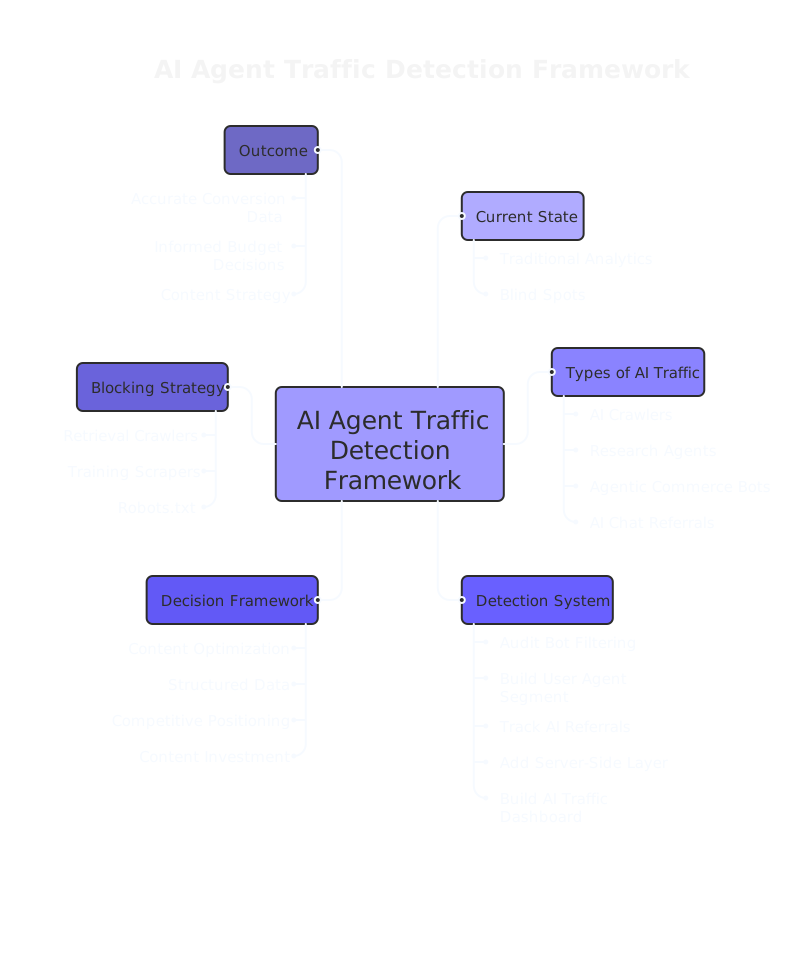
AI agent traffic is non-human visits to your website generated by automated systems built on large language models. These include:
- AI crawlers that index your content for training or retrieval (GPTBot, ClaudeBot, PerplexityBot)
- Research agents that gather competitive intelligence or product data on behalf of a user or company
- Agentic commerce bots that browse, compare, and may even transact on behalf of a consumer
- Referral traffic from AI chat tools where a human asked ChatGPT or Perplexity a question and clicked your link from the response
These are not the same thing. A crawler reads and leaves. A referral sends you a human. An agentic buyer might convert. Treating all of them the same is like treating a billboard impression and a sales call as equivalent events.
McKinsey's research on agentic commerce describes a near future where AI agents act as shopping proxies for consumers. That future is not coming. It is here. And your current analytics tracking setup was built before any of this existed.
The Detection Gap No One Talks About
Here is the scenario worth examining closely.
A mid-sized B2B software company notices a steady climb in "direct" traffic over several months. Sessions are short. Bounce rates are high. No conversions. Their marketing team assumes it is bad ad targeting or a broken landing page. They redesign the page. The numbers do not change.
What actually happened? AI crawlers were hitting the site repeatedly, pulling product descriptions and pricing into model training pipelines. GA4's bot filtering, which relies on the IAB bot list, did not catch most of them. The crawlers were new, not yet listed, and some were using rotating user agents or headless browsers that mimic human behavior.
This is not a hypothetical edge case. Cloudflare's analysis of AI crawler traffic across industries shows that crawler behavior varies significantly by purpose. Crawlers indexing for retrieval look different from crawlers scraping for training. Most analytics platforms are not built to tell them apart.
The problem is not that the traffic exists. The problem is that it is invisible, and invisible things cannot be managed.
How to Detect AI Agent Traffic in Your Analytics Stack
Here is a practical analytics-tracking implementation you can start with today. You do not need to overhaul your entire stack. You need to add a few deliberate layers.
Step 1: Audit Your Current Bot Filtering
GA4 has a setting under Admin > Data Streams that says "Enable Google signals and ads personalization" and a separate toggle to filter known bots. Make sure that toggle is on. It is off by default for some properties.
But do not stop there. GA4's built-in bot list is a starting point, not a solution.
Step 2: Build a User Agent Segment
In GA4, create a custom dimension or use BigQuery to pull raw session data and filter by user agent strings. Look for known AI crawler signatures:
GPTBot(OpenAI)ClaudeBot(Anthropic)PerplexityBotBytespiderDataForSeoBotmeta-externalagent(Meta)
This gives you a baseline view of crawler-originated sessions. It is not perfect. Some agents rotate or spoof user agents. But it catches the ones that identify themselves honestly.
Step 3: Set Up Referral Tracking for AI Chat Tools
This is a different problem entirely. When a human clicks a link inside ChatGPT, Perplexity, or another AI chat tool, that visit often arrives as direct traffic because there is no traditional HTTP referrer header passed.
To track this properly:
- Use UTM parameters in any links you embed in AI-indexed content (like your structured data, schema markup, or cited press releases)
- Monitor for referrals from
chat.openai.com,perplexity.ai, andclaude.aiin your GA4 traffic source report - Create a custom channel grouping in GA4 called "AI Referral" and include those domains
Adobe Analytics users can reference Adobe's technote on AI traffic segmentation, which documents similar referrer-based approaches for their platform.
Step 4: Use Server-Side Signals as a Second Layer
Client-side JavaScript, the kind GA4 relies on, can be blocked, bypassed, or simply not triggered by many AI agents. Headless browsers often execute JavaScript, but not always consistently.
A server-side layer closes that gap. Your web server logs see every request, regardless of whether GA4 fires. Parse your Nginx or Apache logs for the same user agent patterns. Cross-reference with your GA4 data.
Where server logs show traffic that GA4 does not, you have found blind spots.
HUMAN Security's research on AI agent signals identifies several behavioral markers that distinguish agent traffic from human traffic: near-zero session duration, no mouse movement, no scroll depth, rapid sequential page requests. These patterns are visible in server logs even when client-side tracking fails.
Step 5: Create a Dedicated Analytics-Tracking Dashboard for AI Traffic
Once you are collecting the data, surface it. Build a simple dashboard, in GA4, Looker Studio, or whatever BI tool you use, that shows:
- Sessions flagged as known AI crawlers (by user agent)
- Sessions from AI chat referral domains
- Sessions with zero engagement time and zero scroll depth (likely non-human)
- Pages most frequently visited by these sessions
That last point matters. If your pricing page, your comparison page, or your technical documentation is being crawled heavily, that tells you something. AI agents are gathering that data for a reason.
What to Do With the Data
Detection is not the goal. Decisions are.
Here is how to turn your analytics-tracking data on AI agents into real business actions.
If your content is being indexed by AI retrieval crawlers: That is a signal your content is authoritative enough to pull. Lean into it. Optimize your key pages for AI retrieval by making your answers explicit, your structure clean, and your facts sourced. This is the new SEO.
If you are seeing agentic commerce signals: Short sessions, rapid pricing page visits, no cart activity. That is a possible bot evaluating your offer on behalf of a buyer. Make sure your structured data is complete. Make sure your pricing is machine-readable. Agentic buyers are only as accurate as the data they can parse.
If you are seeing competitor research agents: You probably cannot stop them. But you can use that knowledge. If a known scraping tool is hitting your site hard, assume your pricing and positioning is being used in competitive analysis. Adjust what you make visible and how.
If AI referral traffic is converting: Double down on the content that is getting cited. Look at which pages are referenced in AI chat tools by testing your own queries. That is the content worth investing in.
A Note on What Not to Do
Blocking all AI traffic is a common reflex. It is usually a mistake.
If you block GPTBot, OpenAI's crawler cannot index your content for ChatGPT responses. That means when someone asks ChatGPT a question your business could answer, you are invisible. The same logic applies to Perplexity and others.
The smarter move is to be selective. Block crawlers that offer you nothing in return (pure training scrapers with no retrieval benefit). Welcome crawlers that send you referral traffic and brand visibility.
Your robots.txt file is a blunt instrument. Use it with intention, not panic.
The Analytics-Tracking Gap Most Businesses Are Still Ignoring
Most businesses are still treating their analytics setup as a human-only measurement system. That made sense in 2020. It does not make sense now.
The shift is not just technical. It is strategic. Your analytics-tracking strategy needs to account for the fact that a growing percentage of your site's visitors are not people. Some of them are gathering data that influences human decisions. Some of them are making decisions themselves.
If your current reporting does not separate those visitors, you are making marketing decisions with incomplete information. Budget calls, content investments, conversion rate analysis, all of it is skewed.
At House of MarTech, we help businesses instrument their analytics stack for the reality of how the web works today, not how it worked five years ago. That includes setting up AI traffic segmentation, building custom channel groupings, and connecting server-side data to client-side reporting so nothing falls through the cracks.
FAQ: Tracking AI Agents in Analytics
Does GA4 automatically filter AI agent traffic?
GA4 filters bots on the IAB/ABC International Spiders and Bots List, but many AI crawlers are not on that list. You need to add manual user agent filters and BigQuery-based segmentation to catch the rest.
How do I track traffic from ChatGPT referrals?
ChatGPT referrals often appear as direct traffic in GA4 because AI chat interfaces do not always pass referrer headers. Monitor traffic from chat.openai.com in your referral report and create a custom channel grouping for AI chat tools. Use UTM parameters in any content you want to track from those sources.
Should I block AI crawlers from my website?
Not all of them. Crawlers like GPTBot and ClaudeBot index your content for retrieval in AI responses. Blocking them removes you from AI-generated answers. Evaluate each crawler based on whether it offers visibility or just takes your data.
What is agentic commerce and why does it matter for analytics?
Agentic commerce is when AI agents shop, compare, or purchase on behalf of human users. It matters for analytics because those sessions look like bot traffic but may represent real buying intent. Your funnel reporting needs to account for it.
What tools can help detect AI agent traffic?
Server-side log analysis, BigQuery connected to GA4, Cloudflare's bot management, and specialized security platforms like HUMAN Security all provide different layers of detection. No single tool covers everything.
Where to Start
You do not need to solve this all at once.
Start with one thing: pull your GA4 traffic sources report right now and look at direct traffic over the last 90 days. If it is growing without a clear cause, AI agent traffic is a likely contributor.
From there, enable server-side log collection, build your user agent filters, and create your AI referral channel grouping. Each step gives you a clearer picture.
If you want a second set of eyes on your current analytics setup, or if you are not sure where your biggest blind spots are, that is exactly the kind of audit we run at House of MarTech. No pressure. Just a practical conversation about what your data is and is not telling you.
The businesses that figure this out first will have a real advantage. Not because AI traffic is magic. Because knowing what is happening on your own website is the baseline for every good decision you make.
Frequently Asked Questions
Get answers to common questions about this topic
Have more questions? We're here to help you succeed with your MarTech strategy. Get in touch
Related Articles
Need Help Implementing?
Get expert guidance on your MarTech strategy and implementation.
Get Free Audit